Use Termexo MCP to list my workspaces and terminals, and tell me which are running. Do not change anything yet.
WINDOWS / MCP AGENT CONTROL
Let AI operate your agents. Send work. Read results.
Connect an AI to Termexo MCP. Ask it to find a Claude Code, Codex, OpenCode, Pi Agent, Grok Build or Antigravity terminal, send an instruction and read the real reply. Keep tasks, sessions and optional phone access in one Windows workspace.
-
 Claude Code
-
 Codex CLI
-
 OpenCode
-
 Antigravity
-
 Grok Build
 Pi Agent
PS
npx termexo@latest
Phone access is optional. Keep your PC running and use a reachable HTTPS relay plus a desktop access token, or connect directly over a trusted LAN or VPN.
Set up remote relay access ↗
One workspace. Two ways in.
RELAY / LAN / VPN
01RUN ON YOUR PC

Your agents and project stay on the host. No session to move or restart.
02CONTINUE ON YOUR PHONE
Relay · HTTPS
Claude CodeCodex CLIOpenCodeAntigravityGrok BuildPi AgentTask boardMulti-accountDeepSeekMiniMaxGLMMCPNative PTY
MCP / AGENTS IN CONTROL
Stop carrying messages between agents.
MCP is the connection that lets an AI use Termexo's tools. You describe the next step; your connected agent can find another terminal, send input and read its output.
YOU ASK A CONNECTED AI
One clear instruction
Tell the agent what to send and which reply to bring back.
THE LOCAL CONNECTION
Termexo MCP
Find the terminal → send input → submit Enter → read output
Runs on your Windows PC
SIX KINDS OF AGENT TERMINALS
- Claude Code
- Codex CLI
- OpenCode
- Grok Build
- Antigravity
- Pi Agent
-
Prepare your workspace
Open Termexo and a project. Make sure your agent CLI is installed and signed in, and keep Termexo running.
-
Enable the connection
In Settings → AI Control (MCP), enable the local service and automatic connection, choose permissions and Apply. Once the service shows Running, start or restart your agent in Termexo.
-
Check it with one sentence
Paste the read-only check below into your connected agent. A real tool call returning your workspaces and terminals confirms the connection.
Use Termexo MCP to find the running OpenCode terminal in my current workspace, send hi, submit Enter and read its reply. If several terminals match, list their names and let me choose.
DIRECTION / USE CASES
Keep your AI development work connected.
Multiple projects and coding agents can mean scattered windows, missed approvals, and context to explain all over again. Termexo brings the work into view and helps you pick up where you left off.

More projects. Less switching.
Work, side projects, open source
Keep each project's terminals, models, and layout together. Assign agents to implementation, tests, and review, then see who needs you.
Continue tomorrow, or with another agent
Find a saved native session or prepare a handoff with the goal, progress, and next step. Spend less time repeating the background.
Step away without losing touch
Leave your PC running and reconnect from your phone to check output, answer an approval, or send the next instruction.
Organize the work. Keep control.
Project work engineers can follow
Group business projects into workspaces. Engineers use the task board and agent status to assign work, review results, and prepare handoffs.
Providers and environments in one place
Manage model, account, and network profiles for different providers and compatible gateways, with quota visibility where supported.
Access to the development PC you manage
Run the workbench on your organization's Windows PC. Use your own relay or trusted LAN / VPN to reconnect to long-running tasks.
01 / WORKBENCH
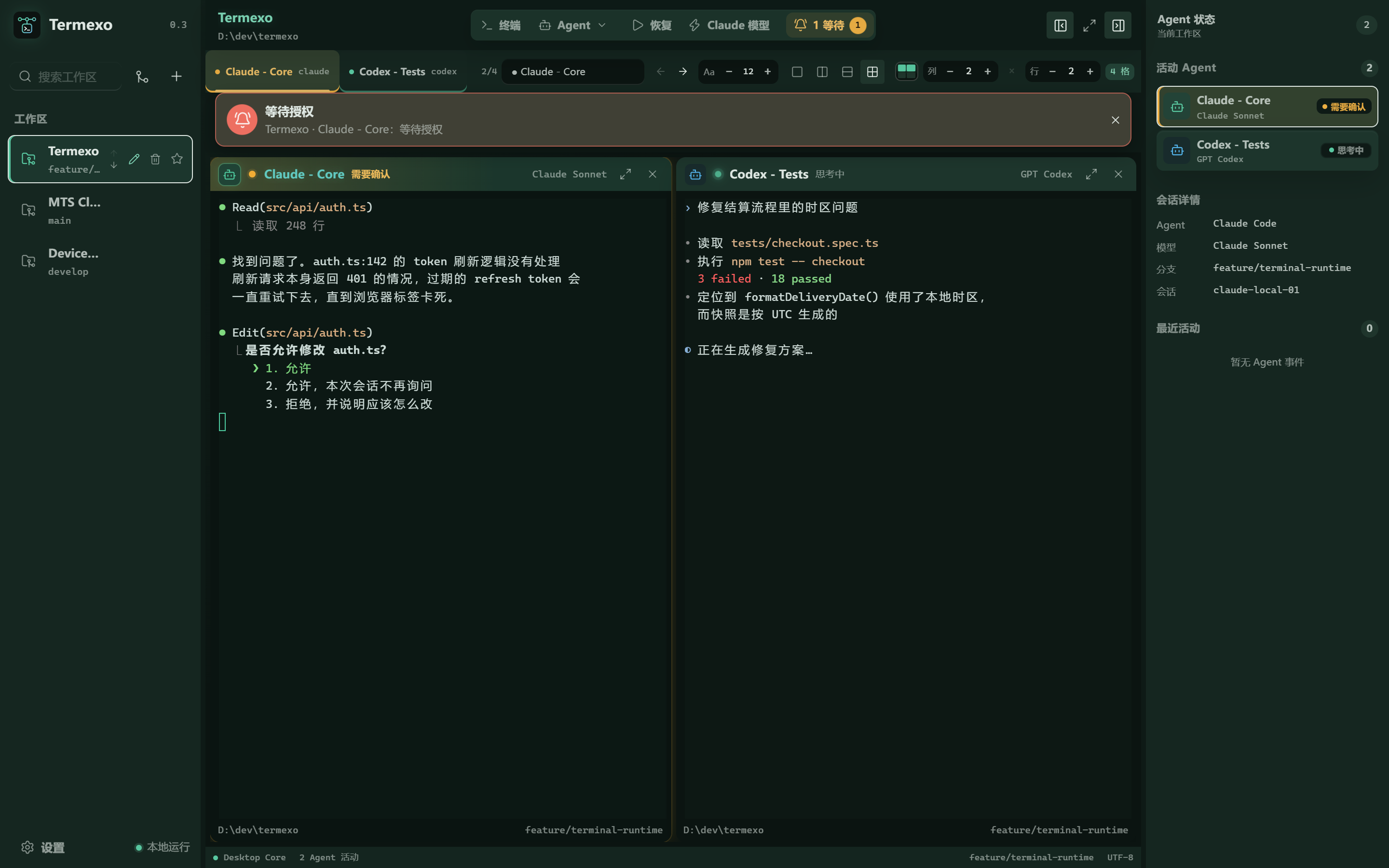
See which agent needs you.
Run supported coding agents in real terminals. Their states stay visible across projects, so you can find the one waiting for your input and return to a native session later.
Antigravity · Two real sessions
30-second real recording · v0.10.6
Every session stays alive in a tab. Show the ones you are watching right now.
Anything from 1 to 6 rows and columns. Each project remembers its own layout.
Same Claude Code you already know, pointed at a different provider.
Your workbench runs on your PC. Remote access is optional, through a relay you manage or a trusted LAN / VPN.
02 / NEVER MISS ONE
It tells you when an agent is stuck.
An agent sitting on an approval prompt helps nobody if you are looking at a different window. Termexo flashes the taskbar, sends a system notification, and keeps a banner on screen until you deal with it — for every project you have open, not just the one in front of you.
- Waiting for approval, waiting for input, and finished all look different at a glance
- Works even when the Termexo window is already focused
- Click the banner to jump straight to that terminal
03 / NOTHING IS LOST
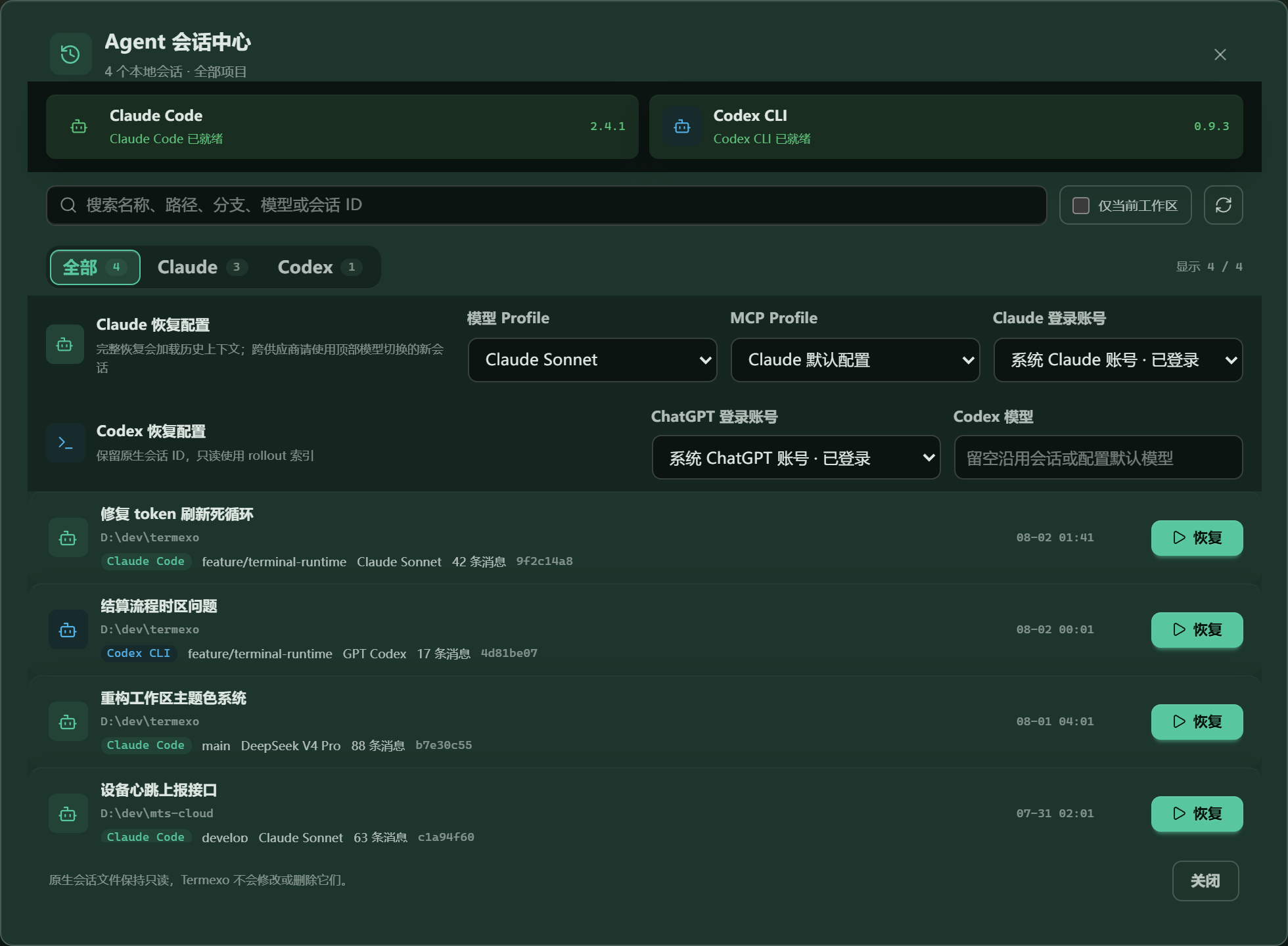
Pick up yesterday's conversation.
Search saved Claude Code, Codex, OpenCode, Grok Build, and Antigravity sessions across projects. Termexo uses each CLI's own resume command to reopen the native context, without changing session files.
- Search across every project by name, path, branch, or model
- Resumes through each supported CLI's native command
- Your session files are read-only — Termexo never edits or deletes them
04 / MODEL ROUTING
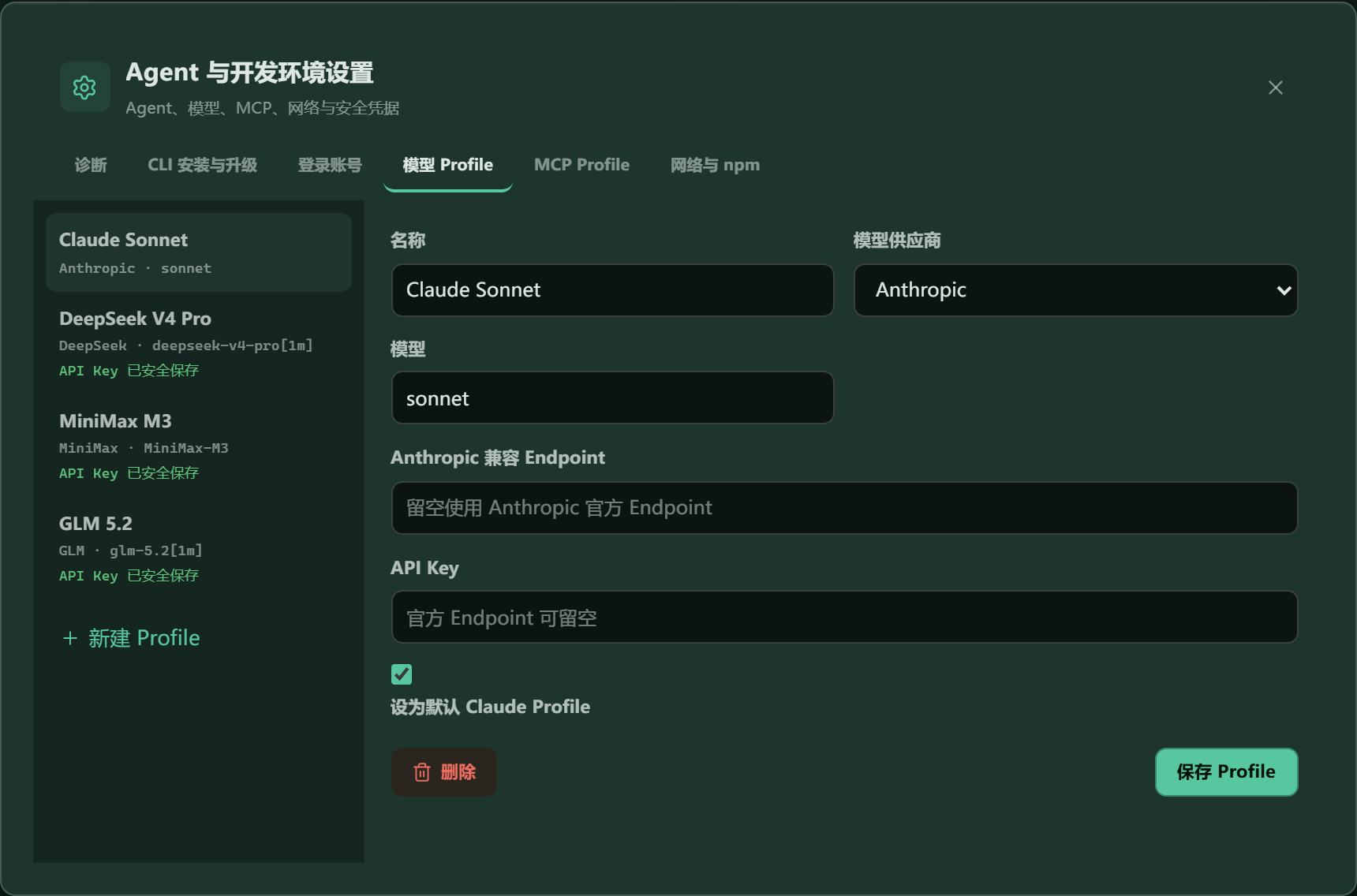
Same CLI. Different model.
Keep using Claude Code, but point it at DeepSeek, MiniMax, GLM, or your own compatible gateway. Save each one as a profile and switch between them in two clicks — no reinstalling, no editing config files by hand.
- Anthropic, DeepSeek, MiniMax, GLM, or any compatible endpoint
- API keys go into Windows Credential Manager, never a plain text file
- Switch every Claude terminal in a project at once
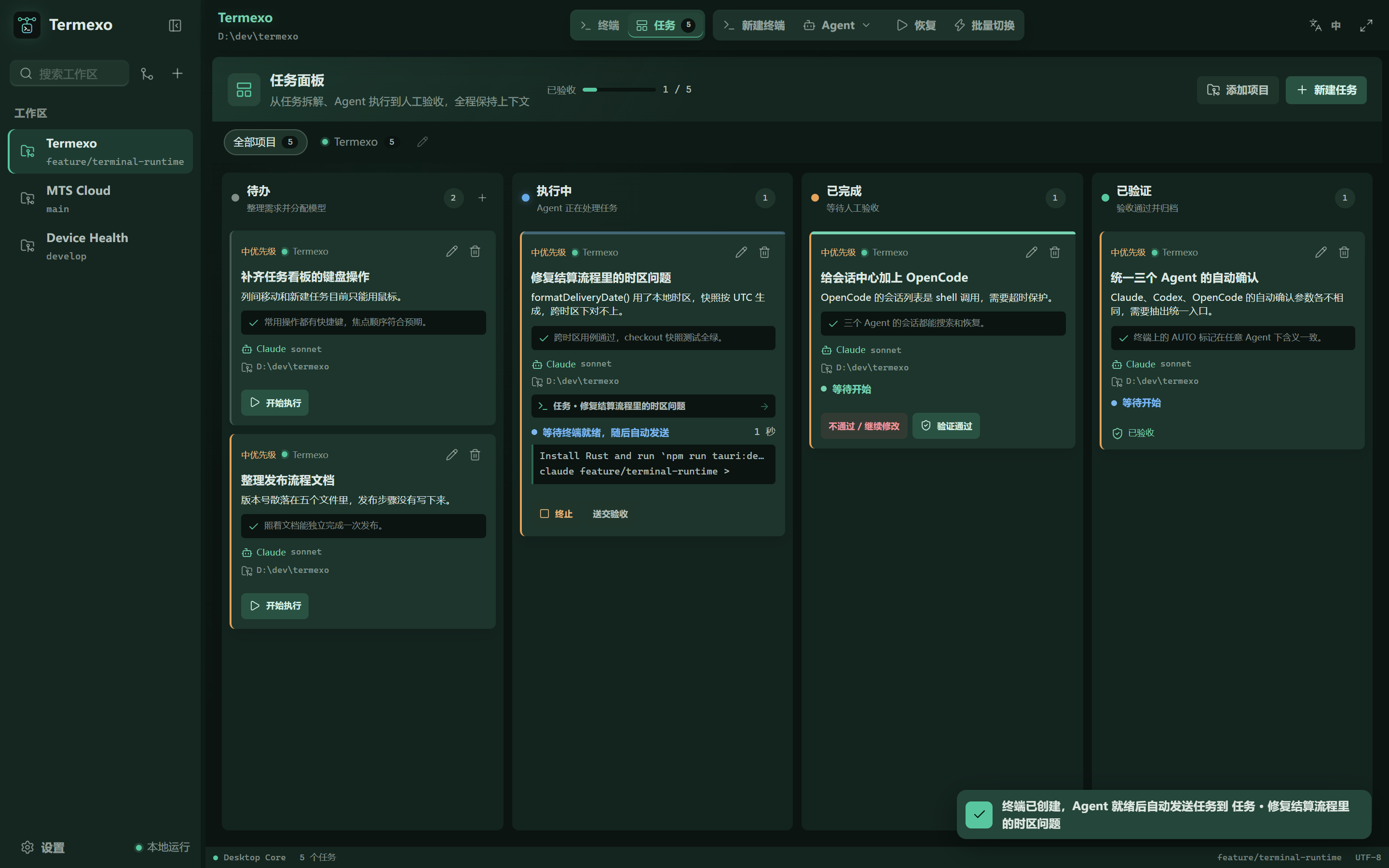
05 / TASK BOARD
Hand the work to an agent.
Write down what needs doing and what counts as done, pick the agent and the project, and the task opens as a real terminal. It reports its own progress back to the board, so you can see what is running without reading every terminal at once.
- Todo, executing, completed, verified — the terminal moves the card
- Send a task to Claude Code, Codex, OpenCode, or Grok Build
- Reject a result with a note and it goes back for another round
06 / ANY DEVICE
Your workbench. Across networks.
Your desktop opens an outbound tunnel to your relay. Open the relay link on a phone, tablet, or another computer to check output and continue the same terminal session. The desktop needs no public IP or router port forwarding.
- Self-host termexo-relay; enroll your desktop with a code or relay account
- Use an HTTPS browser entry point; v2 session frames are encrypted with AES-256-GCM
- Keep your desktop on and Termexo connected; relay login and the desktop access token are separate checks
Relay: Linux / macOS / Windows, x64 / arm64 and containers. Desktop app: Windows 10 / 11.

07 / FEATURES
The things you keep doing by hand.
Most of the friction with coding agents is not the model. It is remembering which terminal was doing what, and setting it all up again tomorrow.
Close it. Reopen it. Still there.
Project folder, grid layout, terminals, and colours come back with the workspace. Drag workspace rows to put projects in your preferred order.
Nothing you close is lost
Find any past Claude Code, Codex, OpenCode, Grok Build, or Antigravity sessions across your projects and reopen their native history.
claude --resume · codex resume · opencode --session
Hand a task to an agent
Write down the task and what counts as done, pick an agent, and it opens as a real terminal that reports its own progress back to the board.
Try a cheaper model on the same task
Point the same CLI at a different provider, switch back if the result is worse, and keep every key in secure storage.
Claude CoreRUNNING
Claude ReviewWAITING APPROVAL
Codex TestsTHINKING
Know the moment it needs you
Waiting, thinking, needs approval, done, failed — shown in the tab, the panel, and the taskbar, across every project at once.
Works in your language
Follow Windows automatically or switch between Chinese, English, Spanish, French, German, Japanese, and Korean at any time.
See your quota before you burn it
Check supported providers' reported quota and reset time. Grok Build shows an exhausted free allowance; unavailable percentages stay unavailable.
Reach your workbench across networks
A self-hosted relay connects your phone to the same desktop terminals. No public IP or router port forwarding on the desktop.
Let one agent operate another
Connect through local MCP to send instructions to existing terminals for all five supported agents and read their output. Manage tasks or permitted settings too; choose access scopes yourself.
Set up MCP →
08 / ROADMAP
What comes next.
Everything above already works. Here is what has shipped, and what is being built next — anything still marked planned is not being sold as finished.
V0.3SHIPPED
Run several agents side by side
Claude and Codex detection, separate logins, resume, custom grids, model profiles, seven interface languages, and everything saved locally.
V0.4SHIPPED
Accounts, installs, and networks
Install or upgrade the CLIs in one click, keep several logins apart, set up proxies for a company network, and watch how much plan quota is left.
V0.5–0.6SHIPPED
Handing work between agents
Session summaries, moving a task from one agent to another, routing work, and notifications.
V0.10.0–0.10.1SHIPPED
Remote relay access
Shipped in v0.10.0: self-hosted relay access, code or account enrollment, cascaded addresses, and v2 encrypted sessions. Your browser operates the terminals already running on your desktop.
V0.10.9SHIPPED
See every agent's status
Compact workspace icons show each agent's state and current window name. Confirm completed work in its terminal, with the selected terminal's branch checked against Git.
V0.10.10SHIPPED
Local MCP control, connected automatically
19 tools for terminals, tasks and settings. Enable the server, select permissions, then launch Claude Code, Codex, OpenCode, Pi Agent, Grok Build or Antigravity. Restart existing Agents to connect.
V0.10.11SHIPPED
Reliable status and easier setup
Codex resume and completion fixes, Grok and Antigravity launch repairs, agent-specific mobile shortcuts, and clearer remote-access and MCP setup.
V0.10.12SHIPPED
Responsive terminals and Codex mobile shortcuts
Keep desktop input and scrolling responsive while reconnecting from a phone, paste clipboard text reliably on Windows, and edit queued Codex input with ⇧←.
V0.10.13SHIPPED
Cleaner proxy, titles and tab states
Single-casing proxy on Windows for every terminal, session scans on older OpenCode CLIs, instruction-free Codex titles, and completed tabs set apart from the selected one.
V0.10.14SHIPPED
Easier Agent setup and Pi support
Install and update six Agents with clear guidance, use the official Antigravity updater, and keep pending reminders flashing until acknowledged.
V0.10.15YOU ARE HERE
Organized projects and clearer account setup
Workspace folders, tags and icons, account login choices, model discovery and upgrade suggestions, and confirmation before closing active Agent terminals.
09 / PRIVACY
Your work. On your computer.
Termexo runs locally by default. Enable remote access when you need it: use your own relay or a trusted LAN / VPN, control the desktop access token, and disconnect from Settings. Your agent CLIs still connect to the model services you configure.
Local by default
Your project paths, sessions, terminal state, and settings sit in a file on your disk. There is no cloud service to sign into.
Your API keys are not in a config files
Keys go into Windows Credential Manager. The app stores only a reference, and the interface can tell you a key exists but never show it back.
Your agent files are read-only
Termexo reads what Claude Code and Codex write, and uses their own resume commands. It never rewrites, renames, or deletes your session history.
BUILD WITH US
One command. No account.
The npm package includes the Windows app. Start locally without a Termexo account, then connect a self-hosted relay when you need access across networks.
Built in the open, under the MIT license. If Termexo helps your workflow, a GitHub Star helps others discover it. Bug reports and contributions are welcome too.